 Exclusive Products
Canon ImageClass LBP122DW Mono Laser Printer Review – Full Features, Performance and Buying Guide
Last updated: December 2025

Key Features & Strengths
- Fast printing speed – up to 29 pages per minute with first-page output in about 5 seconds.
- Automatic duplex printing – prints on both sides, saving paper and reducing costs.
- Monochrome laser output – ideal for text-heavy documents like reports, letters, and assignments.
- Flexible connectivity – supports USB, Ethernet, Wi-Fi, Wi-Fi Direct, and mobile printing.
- Compact design – lightweight and small footprint suitable for home offices or small workspaces.
- Low running cost – toner cartridges have good page yields, and the cost per page is economical.
- Easy maintenance – combined drum and toner cartridge simplifies replacement and reduces hassle.
Overview of Canon ImageClass LBP122DW
Canon built this model for users who want affordability without compromising quality. The printer focuses on essential features that boost productivity such as quick warm up, high print speed, sharp text clarity and a user friendly interface. The compact body allows this machine to fit easily on any desk. It is designed to handle documents, forms, letters, invoices and all types of office paperwork accurately and consistently.
Key Highlights
- Fast mono laser printing with excellent text clarity
- Compact body ideal for small spaces
- Wireless, mobile and cloud printing support
- Automatic two sided printing
- Energy saving mode for lower power use
- Simple control panel and easy setup
Fazter vs Traditional E-Commerce Sites: Price, Value & Savings Compared

Design and Build Quality
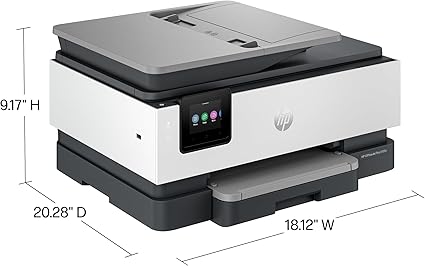
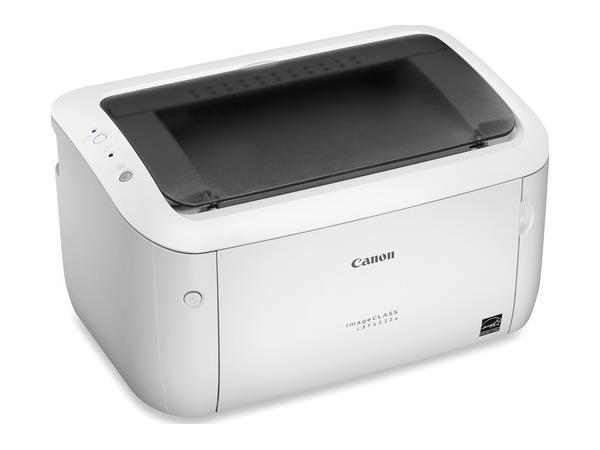
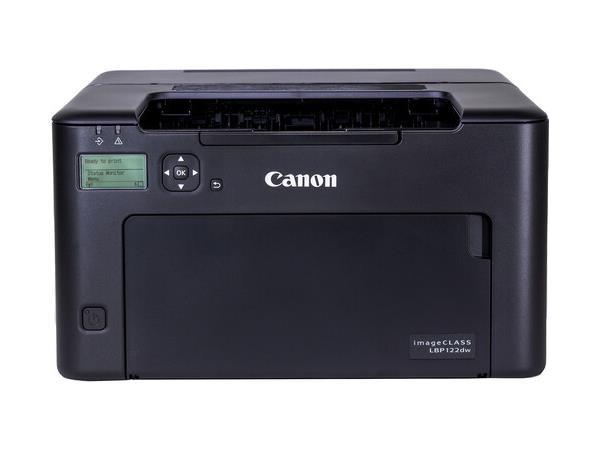
The Canon ImageClass LBP122DW is compact and lightweight. The chassis is made from durable quality materials that keep the device stable during high speed printing. The top loading paper output tray is easy to access and the front loading paper tray makes refilling paper simple for beginners. The clean design keeps the printer professional looking and suitable for any space such as an office table, shop counter or home workstation.
Compact Footprint
One of the strengths of this printer is its small size. Many users with limited desk space need something that does not occupy too much room. This device provides exactly that support. Even with a compact build, the device can manage a heavy workload with consistent performance.
Print Quality and Performance
The highlight of this printer is its mono laser print engine. Every printed document is sharp, neat and easy to read. Whether you print text, charts or small fonts the quality remains consistent. The toner helps in delivering dark and crisp characters that look professional on every page.
Fast Printing Speed: Speed is important for business work and the Canon ImageClass LBP122DW performs very well in this area. It delivers pages quickly from the start to finish. Even large batches of documents come out swiftly which helps improve productivity at the workplace. The first page print time is also short which reduces waiting time.
Automatic Duplex Printing: The automatic two sided printing feature is extremely useful for saving paper. You do not need to manually flip sheets. The printer automatically prints on both sides which is helpful for making booklets, reports and multi page files. This also reduces printing cost in the long run.
Toner Efficiency: The toner cartridge used in this model delivers a high page yield which means you spend less on replacements. The cost per page is low making this printer a budget friendly option for users who print frequently. The toner installation is simple and mess free.
Connectivity Features
Canon added many modern connectivity options in this printer to support all types of users. It does not depend only on a wired setup. You can print directly from mobile devices, laptops or tablets without using cables.
Wireless Printing
The built in Wi Fi makes it easy to connect the printer with your network. Multiple users can print documents without plugging in any cable. This is helpful in shared office places where everyone uses one common printer.
Mobile Printing Support
- Canon PRINT Business app support
- Apple AirPrint support
- Android mobile printing support
- Direct printing from cloud or email apps
These options allow you to send documents from your phone instantly. Students, professionals and home users can quickly print notes, receipts, tickets and more without turning on a computer.
USB Connectivity
If you prefer a wired connection, the USB port ensures stable printing with no interruptions. Many users still rely on USB because it is simple and secure.
Ease of Use
Canon always focuses on user experience and this printer is no exception. Setting up the device is straightforward even for first time users. The simple control panel helps navigate basic functions without confusion.
Simple Setup Process: From unboxing to first print, the setup takes only a few steps. The included manual explains everything in a clear manner. Drivers can be installed automatically when connected to a computer or downloaded from the Canon support website.
Clear Display Panel: The control panel includes simple buttons and indicators that show printer status. Even users who are not tech savvy can operate the device comfortably.
Quiet Operation: The printer makes minimal noise which helps maintain a peaceful environment. This is especially useful in home offices or library like spaces.
Paper Handling and Capacity
The Canon ImageClass LBP122DW supports a variety of paper sizes. The main tray holds enough sheets for daily tasks so users do not have to refill paper frequently.
Supported Paper Types
The printer keeps sheets aligned perfectly to avoid paper jams. It also reduces wastage and maintains accuracy for every print.
Energy Efficiency
The energy saving mode reduces power consumption when the printer is idle. This makes the device eco friendly and budget friendly. The auto sleep and wake function helps lower electricity use without affecting performance.
Who Should Buy This Printer
- Home office users who print documents daily
- Students needing assignments and notes printed quickly
- Shops and small businesses printing forms and bills
- Work from home employees
- Startups looking for a cost effective black and white printer
Pros of Canon ImageClass LBP122DW
- Compact and modern design
- Fast printing and sharp text quality
- Wireless and mobile print support
- Automatic duplex printing
- Low running cost
- Reliable for high volume printing
Cons of Canon ImageClass LBP122DW
- No color printing as it is mono laser only
- No scanning or copying features
- Suitable mainly for document printing
- Print speed: 29 ppm
- Resolution: Up to 600×600 dpi (refined to 2400×600 equivalent)
- Paper input: 150 sheets
- Connectivity: USB, Ethernet, Wi-Fi, Wi-Fi Direct, mobile printing
- Toner cartridge: Standard (~1,200 pages) or High-yield (~2,500 pages)
- Dimensions: 356 × 283 × 213 mm
- Weight: ~5.6 kg
Technical Overview
COMPARISON TABLE
| Feature | Canon ImageClass LBP122DW | HP LaserJet M110we | Brother HL L2370DW |
|---|---|---|---|
| Type | Mono Laser Printer | Mono Laser Printer | Mono Laser Printer |
| Print Speed | Fast and efficient | Moderate | High speed |
| Duplex Printing | Automatic | Manual | Automatic |
| Wireless Printing | Yes WiFi and mobile printing | Yes but limited features | Yes strong WiFi support |
| Best For | Home office and small business | Home basic printing | Heavy duty office printing |
| Cost per Page | Low | Medium | Low |
| Overall Rating | Excellent value | Good for basic use | Great for heavy workload |
Frequently Asked Questions
Does the Canon ImageClass LBP122DW support color printing
No. This is a mono laser printer which means it prints only black and white documents.
Can I print from my mobile phone
Yes. The printer supports mobile printing through Canon PRINT Business app, Apple AirPrint and various Android printing options.
Does this printer have automatic two sided printing
Yes. It includes automatic duplex printing for printing on both sides of the paper.
Is this printer good for office use
Yes. It is designed for both home and small office use. The fast print speed and low running cost make it great for daily document work.
Does it support Wi Fi connectivity
Yes. The printer includes Wi Fi for wireless printing from multiple devices.
Is installation easy for beginners
Yes. Canon provides a simple setup guide and easy to install drivers that make installation smooth for all types of users.
Conclusion
The Canon ImageClass LBP122DW mono laser printer is an excellent choice for users who need high quality black and white printing at low cost. It delivers fast performance, wireless connectivity, automatic duplex printing and strong build quality.
Buy Best Printers for Home & Office